
So, what does it really mean to archive social media? It’s about building a complete, unchangeable, and easily searchable record of everything that happens on your social channels. This used to be a niche task just for legal teams, but that’s completely changed. Now, it's a critical job for developers training AI models, SEOs digging into performance metrics, and QA teams trying to keep everything visually consistent.
Why Social Media Archiving Is Now a Developer's Game
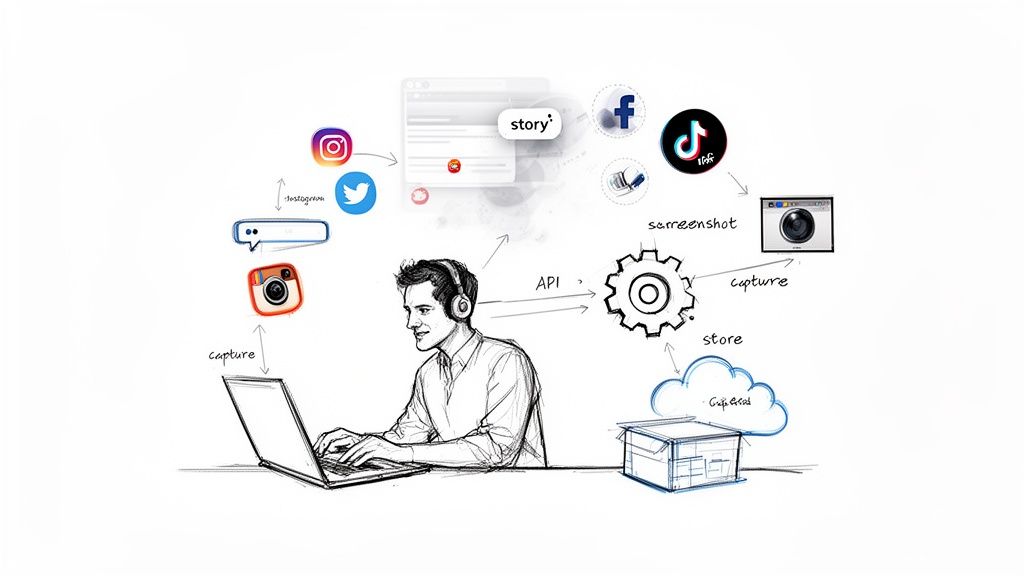
The sheer scale of social media is staggering, and that's the root of the challenge. We're looking at a projected 5.41 billion users by 2025—that’s almost 66% of everyone on the planet. And it's not slowing down; an additional 241 million new users jumped on board in the last year alone. For anyone trying to keep a record, this creates a firehose of content that demands reliable tools for capturing web pages. You can dive deeper into these numbers in a social media trends report from Broadband Search.
This constant churn of content is a real headache for developers. Think about it: capturing something as temporary as an Instagram Story or rendering a complex, interactive ad is way beyond simple web scraping. You're often fighting against restrictive platform APIs while trying to manage massive datasets without everything grinding to a halt.
The Developer's Stake in Archiving
For technical teams, a smart archiving strategy isn't just a "nice-to-have." It’s about building a dependable historical record that can be used for everything from technical validation to business strategy.
This table summarizes the core business and technical reasons for archiving social media, helping you quickly map the value to your specific project needs.
Key Drivers and Use Cases for Social Media Archiving
| Driver | Technical Use Case | Business Goal |
|---|---|---|
| Data Science & AI | Training models for sentiment analysis, trend prediction, and NLP | Gain competitive intelligence and understand customer sentiment |
| SEO & Marketing | Capturing SERPs and social link previews to monitor content visibility | Analyze competitor strategies and diagnose performance issues |
| Quality Assurance | Creating visual baselines for regression testing of UIs on social platforms | Ensure visual consistency and a stable user experience after updates |
| Legal & Compliance | Maintaining an immutable record of communications for eDiscovery and audits | Mitigate risk and meet regulatory requirements (e.g., FINRA, SEC) |
| Customer Support | Archiving customer interactions to analyze support quality and escalations | Improve service quality and identify recurring customer issues |
Ultimately, a well-structured archive provides the ground truth you need to build better products, make smarter decisions, and protect your organization.
The core challenge isn't just collecting data; it's capturing context. A simple text log misses the visual nuance of a social media post, which is often where the real message lies. A pixel-perfect screenshot, however, tells the whole story.
This guide is your practical playbook for building a reliable and automated system to archive social media. We’ll walk through everything from making direct API calls to setting up sophisticated screenshot automation with tools like ScreenshotEngine, always framing it from a developer's point of view.
Charting Your Course: Goals, Scope, and Your Archiving Policy
Jumping into a social media archiving project without a clear plan is like setting sail without a map. You might capture something, but it probably won't be what you actually need. Before you even think about code, you have to nail down precisely what you need to save and, more importantly, why.
This isn't just busywork; it's about tying your technical efforts to real-world outcomes. Are you trying to satisfy eDiscovery requests for the legal team? Maybe you're building a clean dataset for a machine learning model. Or perhaps you're just keeping an eye on brand sentiment and what your competitors are up to. Each of these goals completely changes the game plan.
What to Capture and Where to Find It
First things first: which platforms are absolutely essential? Don't try to boil the ocean. Zero in on the channels where the most important conversations and content live. For a B2B company, that’s probably LinkedIn and X (formerly Twitter). For a consumer brand, it’s more likely Instagram and TikTok.
Once you know the where, get specific about the what. Just grabbing the text from a post is rarely enough. Modern social media is a rich, messy web of interactions. You need to think about:
- The Basics: The core posts, tweets, and updates.
- The Conversation: Comments, replies, likes, shares, and retweets. This is often where the real context is.
- The Visuals: Images, videos, GIFs, and especially ephemeral content like Instagram Stories or Fleets.
- The Private Stuff: Direct messages and private group chats. Tread very carefully here and be hyper-aware of privacy laws.
- The Interactive Bits: Things like polls, interactive ads, or user-generated content that’s part of a thread.
Think about it this way: a financial services company will absolutely need to archive every single comment and DM to stay compliant. On the other hand, a marketing agency analyzing a campaign might only care about the public posts and their engagement numbers.
A post without its comments is a story half-told. For any serious legal or analytical work, capturing the entire conversation isn't a nice-to-have, it's a must. The context is everything.
Setting a Sensible Capture Cadence
Next up, how often are you going to pull this data? The answer depends entirely on your goals and how fast the content changes. Not everything needs to be captured in real-time, which can burn through resources and API quotas like crazy.
- Real-Time: This is for the high-stakes stuff. Think monitoring a crisis, tracking a viral trend as it happens, or archiving regulated financial communications where every second counts.
- Daily: A solid default for most active brand accounts, competitor tracking, and general sentiment analysis. It's frequent enough to catch most things before they get deleted or edited.
- Weekly or Monthly: Perfectly fine for less urgent tasks, like tracking long-term brand health or archiving high-level performance metrics.
Consider the shelf life of the content you're after. An Instagram Story disappears in 24 hours, so a daily capture is the absolute minimum you'd need. But if you're just tracking changes to a competitor's profile page, a weekly snapshot will do the job. Getting this cadence right is a huge strategic decision that directly impacts your costs and complexity, ensuring you get the data you need without drowning in overhead.
Choosing the Right Social Media Capture Method
Alright, you've set your goals. Now comes the fun part: picking your tools. The technical path you choose to archive social media content will make or break your project, directly influencing the quality of your archive, how reliable it is, and what it costs to run.
I've seen developers go down three main roads, and each one has some serious trade-offs.
Think of it like choosing a camera. You could go with a high-end DSLR for perfect, structured shots (APIs), a manual film camera that gives you flexibility but a high risk of blurry photos (web scrapers), or a modern mirrorless camera that captures exactly what you see with perfect fidelity (screenshot APIs).
Official Platform APIs: The Structured but Restrictive Route
The "by the book" method is to use the official APIs that platforms like Meta (for Facebook and Instagram) and X provide. They are designed for developers to pull data programmatically, usually in a clean, structured JSON format.
The big win here is data quality. You get neatly organized information with all the right metadata—post IDs, timestamps, user details. This makes it a breeze to load into a database for easy searching and analysis.
But—and it's a big but—APIs are full of gotchas. They almost always have strict rate limits, which means you can only make a certain number of requests before they cut you off. For any large-scale archiving job, you’ll hit those walls fast. Even worse, platforms can change or kill off API endpoints with very little warning, which can bring your entire operation to a screeching halt overnight.
Custom Web Scrapers: The Flexible but Fragile Option
When an API won't give you what you need, the next logical step for many is web scraping. Using tools like Puppeteer or Selenium, you can write a script that acts like a real person, navigating to a social media page and ripping the content right out of the HTML.
The appeal is obvious: total flexibility. You can grab pretty much anything visible on the screen, including things APIs would never expose, like dynamically loaded ads or specific user interactions.
This freedom, however, comes at a steep price. Scrapers are notoriously brittle. A tiny change to a website's CSS class names can shatter your script. Social media companies also actively hunt down and block scrapers, so you'll find yourself in a constant battle against IP bans and CAPTCHAs. It's a high-maintenance headache.
Screenshot APIs: The High-Fidelity Visual Approach
There's a third way that's become my go-to for many projects: using a screenshot API. Instead of just pulling text and metadata, this method captures a pixel-perfect visual record of the content exactly as a user saw it at a specific moment. You get a complete, verifiable image of the post, the comments, and all the surrounding context.
This visual proof is absolute gold for compliance, eDiscovery, and quality assurance. While an API gives you structured data, a screenshot proves what was actually on the screen. This is a game-changer for capturing ephemeral content like Instagram Stories or the chaotic, layered layout of a TikTok feed.
For anything involving legal or compliance needs, context is king. A JSON object from an API can be argued over, but a timestamped, pixel-perfect screenshot of a webpage is powerful, unambiguous evidence. It captures the user experience, not just the raw data.
Services like ScreenshotEngine are built specifically for this. They manage all the messy backend work of running headless browsers at scale, and they even automatically block ads and cookie popups to give you a clean capture. This makes it incredibly simple to archive social media pages with a single API call.
This flowchart can help you map your archiving goals to the right technical strategy.
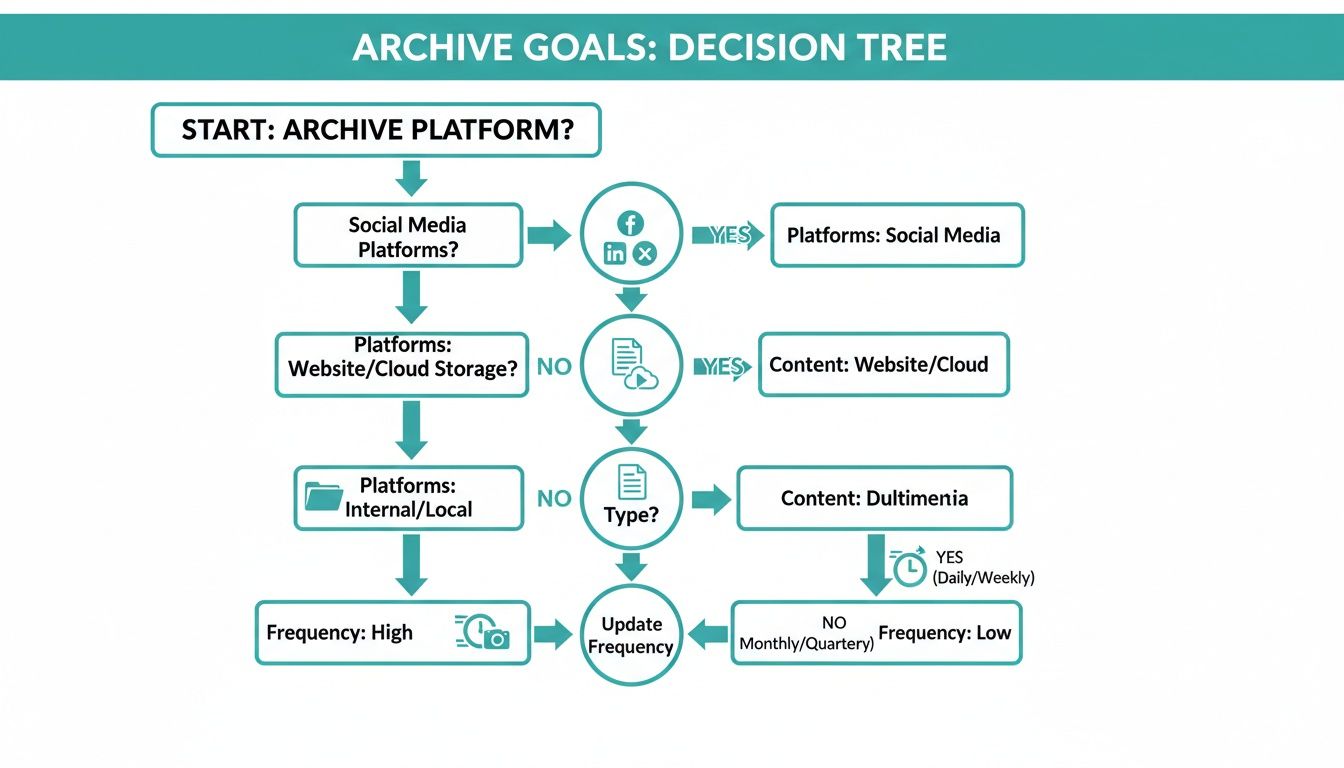
As you can see, figuring out which platforms you need, what content to save, and how often you need to capture it will point you directly to the best tool for the job.
A Practical Comparison of Archiving Methods
To make the choice clearer, here’s a head-to-head comparison to help you weigh the real-world trade-offs of each approach.
| Method | Pros | Cons | Best For |
|---|---|---|---|
| Official APIs | Clean, structured data; reliable metadata; officially supported. | Strict rate limits; sudden endpoint changes; limited access to visual content. | Pulling specific data points like text and user info into a database at a moderate scale. |
| Web Scrapers | Highly flexible; can capture content not available in APIs. | Extremely brittle; easily blocked by platforms; high maintenance; potential legal risks. | Niche, small-scale projects where APIs just won't work and you have the resources to constantly fix it. |
| Screenshot APIs | High-fidelity visual proof; captures the full user context; reliable and simple to implement. | Data is an image, not structured text; reliant on a third-party service. | Compliance, eDiscovery, visual QA, and archiving ephemeral or highly dynamic content where "how it looked" matters. |
Ultimately, choosing the right method comes down to balancing what you need against the resources you have.
The sheer scale of social media today makes this decision critical. We're looking at a projected 5.42 billion social media users by 2025—that's 60% of the entire global population. Platforms like Instagram (2 billion monthly active users) and TikTok (1.5 billion+ monthly active users) are driven by content that disappears in 24 hours. For anyone doing brand monitoring, legal discovery, or even training an AI, being able to capture that fleeting content accurately is non-negotiable.
For a developer, the simplicity of a service like ScreenshotEngine is a huge relief. You get all the power of a sophisticated capture system without having to build or maintain any of the complex infrastructure yourself. It just works.
Building an Automated and Scalable Archival Workflow
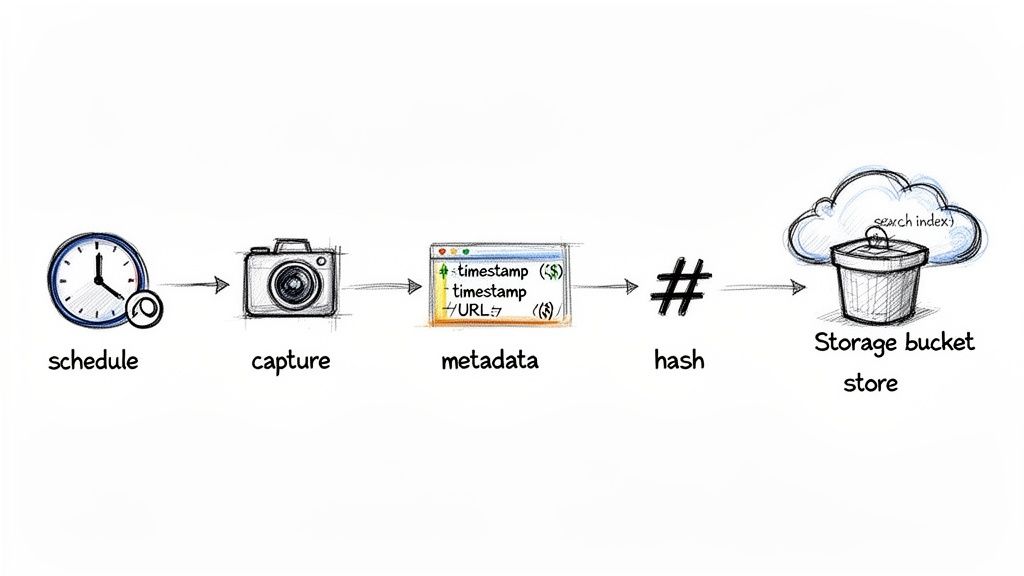
Okay, let’s move from planning to practice. The real magic happens when you build a system that can reliably archive social media content without you having to constantly look over its shoulder. A solid workflow should be automated, scalable, and resilient. You're aiming for a "set it and forget it" process that hums along in the background, making sure you never miss a critical post.
This means connecting a few key pieces: something to trigger the captures, the capture mechanism itself, and a system for storing and finding the results later. For anyone building a serious archiving system, getting comfortable with automating data pipelines is a game-changer for keeping things efficient as you scale up.
Setting Up Scheduled and Triggered Captures
First things first: how do you tell your system when to grab the content? Your two main options are scheduled jobs or event-driven triggers.
Scheduled jobs are the bread and butter. They run on a predictable clock—every hour, once a day, you name it.
- Cron Jobs: This is the old-school, tried-and-true tool for Unix-based systems. A simple cron expression can kick off your capture script with pinpoint precision.
- Serverless Functions: Modern cloud services like AWS Lambda or Google Cloud Functions are perfect for this. You can schedule them with built-in triggers and only pay for the seconds they run, which is incredibly cheap.
Event-driven triggers are a bit more dynamic. Instead of a fixed schedule, they react to things happening in real time. For example, a webhook could tell your system to start a capture the instant a new post is detected. This is the way to go for capturing fast-moving conversations or tracking viral trends. For a deeper dive, our guide on how to monitor a webpage for changes gets into the nuts and bolts of setting this up.
Pro Tip: Don't overcomplicate it at the start. A simple daily scheduler using a serverless function is a fantastic, low-maintenance foundation. You can always layer in more complex, event-driven triggers as your project grows.
Preserving Context with Rich Metadata
An archived post without its context is pretty much useless. It’s not enough to just save a screenshot or a chunk of text; you have to grab the metadata that gives it meaning and proves it's the real deal.
For every single piece of content you archive, make sure you're recording:
- Timestamp: The exact date and time of the capture, down to the second and including the timezone. This is non-negotiable for legal or compliance work.
- Source URL: The specific URL where the content lived.
- Capture Details: How you captured it (e.g., API call, screenshot), including any relevant settings like the browser viewport size.
- Ownership Information: The username or account that originally posted it.
This data is what turns a simple file into a verifiable record. When you need to prove who said what and when, this metadata is your source of truth.
Choosing Your Storage and Indexing Solution
Once you've captured the data, it needs a safe place to live. Your storage solution has to be durable, scalable, and affordable. For most of us, that means cloud storage.
Services like Amazon S3, Google Cloud Storage, or Azure Blob Storage give you practically infinite space and are built to never lose data. You can organize your archives with a logical folder structure, maybe something like platform/user/year/month/day/ (e.g., instagram/username/2025/10/26/).
But just dumping files into a storage bucket creates a data swamp—you'll never find anything. That's where indexing comes in. As each item is stored, its metadata should be added to a searchable database.
- For smaller projects: A simple spreadsheet or a lightweight database like SQLite can get the job done.
- For larger scale: You'll want a more powerful database like PostgreSQL or a search engine like Elasticsearch. This lets you instantly find content based on keywords, dates, or users.
Ensuring Data Integrity with Cryptographic Hashes
To create an archive that's truly tamper-evident, you need to be able to prove a file hasn't been touched since you captured it. This is a job for cryptographic hashing.
A hash function, like SHA-256, takes your file and crunches it down into a unique, fixed-length string of characters—its "hash" or digital fingerprint.
- Immediately after capturing an item, calculate its SHA-256 hash.
- Store this hash right alongside the file and its other metadata in your database.
- If the file's authenticity is ever questioned, you just recalculate the hash. If it matches the original, you have mathematical proof that it’s unchanged.
This simple process creates an immutable chain of custody, which is essential for things like legal holds and eDiscovery. The need for this is only growing. In 2025, global screen time on social platforms hit 2 hours and 41 minutes daily, a 6% jump from the previous year. That firehose of content generates petabytes of data that developers must preserve perfectly for everything from historical analysis to regression testing.
Navigating Compliance and Data Retention Policies
Building a social media archive is a huge technical win, but that victory is short-lived if it isn't legally sound. For developers, the compliance landscape can feel like a minefield. The good news is, it doesn't have to be.
This is about more than just checking a box; it's about responsible data stewardship. When you archive social media, you're handling a massive amount of personal information. That puts you right in the middle of some serious legal obligations, from the moment of capture to the final deletion.
Understanding Key Privacy Regulations
You don't need a law degree, but you absolutely need to be aware of the major data privacy laws. These regulations give people specific rights over their personal data, and your archive must be built to respect them.
Here are the big ones you'll run into:
- General Data Protection Regulation (GDPR): This EU law is the gold standard for data privacy. It gives individuals the "right to be forgotten," which means you need a rock-solid process for deleting someone's data from your archive if they make a valid request.
- California Consumer Privacy Act (CCPA): California's law is similar in spirit to GDPR. It gives consumers the right to know what data you've collected about them and to ask you to delete it.
The most effective approach is to embed data protection into your system from the very beginning. This concept, often called Privacy by Design, is essential for earning trust and avoiding headaches down the road. If you're looking for a great starting point, check out A Practical Guide to Privacy by Design which does a fantastic job of explaining the core principles.
The Critical Role of Legal Holds and eDiscovery
Let’s talk about one of the most practical reasons for having a social media archive: legal proceedings. This is where eDiscovery (electronic discovery) comes into play. If your company gets involved in litigation, you could be ordered to produce every relevant communication about a specific case. Your archive is your first line of defense.
A legal hold is an official directive to preserve specific information, overriding your normal data deletion schedules. When a legal hold comes down, your system must be able to find, isolate, and protect the relevant records so they can't be changed or deleted.
An immutable, precisely timestamped archive is non-negotiable for eDiscovery. Without it, you can't prove the authenticity of your records, leaving them vulnerable to being challenged in court. This is why cryptographic hashing and detailed metadata are so critical.
This is where the capture method you choose really matters. A simple text log is easy to dispute. On the other hand, a pixel-perfect screenshot from a service like ScreenshotEngine provides a verifiable, visual snapshot of exactly what appeared on screen at a specific moment in time, making it much harder to contest.
Crafting Clear Retention and Deletion Policies
You can't keep everything forever, nor should you want to. Hoarding data indefinitely is expensive and dramatically increases your legal risk. A formal data retention policy is your rulebook, defining how long specific types of information must be kept.
This is not a solo mission; you need to work closely with your legal or compliance team. They'll help you set the retention periods based on regulatory mandates and business needs. For example, companies in finance often have strict requirements to keep all communications for years.
When a record's retention period is up, you need a secure, documented process for deleting it. This prevents you from holding onto data longer than necessary, which is a key requirement under laws like GDPR. A solid policy should clearly define:
- What data is kept: Be specific about platforms (e.g., Twitter threads, LinkedIn comments).
- How long it is kept: Set clear timeframes for different data categories.
- How it is securely deleted: Outline the technical steps for permanent removal.
By establishing these rules upfront, you ensure that your efforts to archive social media are not just a technical success but a fully compliant, legally defensible asset for the business.
Putting It All Together: A Resilient Social Media Archive
When it comes to archiving social media, there's no single magic bullet. The best approach is always a mix of a solid policy, the right tools for the job, and an automated workflow that you can set and forget. We've looked at different capture methods, and each has its strengths, but the end goal is always the same: creating a secure, valuable, and legally sound historical record.
APIs are fantastic for grabbing structured data, and web scrapers give you the flexibility to get content from almost anywhere. But for the ultimate proof and context, nothing beats a high-fidelity visual record. Capturing what the user actually saw on their screen—the full post, the comment thread, and any interactive bits—creates an undeniable snapshot in time.
From Digital Noise to a Defensible Asset
By weaving these strategies together, you’re not just hoarding data; you’re building a compliant archive that will serve your business for years. This is about transforming ephemeral chatter into a searchable, verifiable asset.
A truly future-proof archive answers two critical questions: "What was said?" and "What did it look like?" That visual context is often the most powerful piece of the puzzle, whether you're dealing with a legal challenge, analyzing competitor moves, or just preserving your own brand's history.
For the developers in the room, creating this visual layer isn't always straightforward. Getting a pixel-perfect capture of a dynamic social media feed is tricky, and it's worth getting familiar with common website screenshot challenges to build a system that won't break.
At the end of the day, a well-planned archive turns fleeting social media moments into a lasting business advantage. It’s a shield for your organization, a library for your brand’s story, and a goldmine of data for future insights. The work you put in today will absolutely pay off down the road.
Got Questions About Social Media Archiving? We've Got Answers.
Even with the best-laid plans, you're bound to hit some tricky questions once you start archiving social media. Getting straight answers can save you a ton of headaches and help you sidestep the common traps that snag even experienced developers. Let's tackle some of the most common ones I hear.
How Should I Handle Edited or Deleted Content?
This is the big one, isn't it? The key is to think of your archive as a series of snapshots in time. When a user edits a post, your ideal archive should actually store both versions—the original and the edited one, each with its own timestamp. This way, you’re building a true history of the conversation, warts and all.
As for deleted content, you’ve got one shot to grab it before it’s gone for good. This is where your capture frequency becomes absolutely critical. If a controversial post is up for only a few hours but your script runs just once a day, you'll never even know it existed.
What Is the Best Format for Storing Archived Data?
There's no single "best" format; it really boils down to what you plan to do with the data. In my experience, a hybrid approach is the most practical and gives you the most flexibility down the road.
- JSON from APIs: This is your go-to for structured, machine-readable data. It’s perfect if you need to run analytics, search through content, or feed the information into other systems.
- PNG/JPEG Screenshots: Absolutely essential for visual proof. A screenshot is the undeniable evidence you need for compliance checks or eDiscovery. It captures the entire user experience in a way raw data never can.
- WARC (Web ARChive): This is the heavyweight champion of long-term preservation, used by institutions like the Internet Archive. It packages everything (HTML, CSS, images) into one file. While incredibly thorough, it can be overkill and complex for many business needs.
For most projects, combining JSON for the raw data with high-fidelity screenshots for visual verification is the winning strategy.
Storing just the raw data misses the story. A screenshot captures the design, the surrounding ads, and the emotional impact of the layout—all crucial context that raw text and metadata alone simply cannot convey.
Can I Archive Content from Private Accounts or Groups?
Technically, yes, it’s often possible. But legally and ethically? You're stepping into a minefield.
Archiving content from private accounts or closed groups without getting explicit consent from every single member is a huge privacy risk. You could easily run afoul of regulations like GDPR or CCPA.
My advice is to stick to publicly available content. If you have a legitimate reason to archive private communications—like monitoring employee conduct in a regulated field—you absolutely must have a bulletproof policy and get clear, informed consent from everyone involved first.
Ready to capture high-fidelity, pixel-perfect records of any social media page? ScreenshotEngine provides a simple API that delivers clean, reliable screenshots in milliseconds, automatically handling ads and popups so you can focus on building your archive. Start for free at ScreenshotEngine's website.