If you're a developer trying to decide between Playwright and Puppeteer, I'll cut to the chase. For new projects, especially those needing solid cross-browser testing and modern features right out of the box, Playwright is the clear winner. However, if your work is already deeply embedded in the Chrome ecosystem or you're maintaining an existing Puppeteer setup, it remains a powerful and dependable choice.
Understanding the Core Differences
At its heart, the choice between Playwright and Puppeteer boils down to a classic trade-off: comprehensive cross-browser support versus deep, Chromium-specific control. Both are fantastic Node.js libraries for browser automation, but they were built with different philosophies.
Playwright, which comes from Microsoft, was designed from day one to be a cross-browser tool. It offers a single, unified API to control Chromium, Firefox, and WebKit. This is a massive advantage for end-to-end testing where you absolutely need to confirm your application works identically across Chrome, Firefox, and Safari.
On the other hand, Puppeteer was created by Google with a laser focus on the Chromium engine. It provides unparalleled integration with the Chrome DevTools Protocol (CDP), making it incredibly powerful for high-performance automation tasks that are centered purely on Chrome.
Playwright vs Puppeteer At a Glance
To help you make a quick decision, here's a table that breaks down the most important differences at a glance. It's a high-level summary of what truly sets these two tools apart in practice.
| Criterion | Playwright (Microsoft) | Puppeteer (Google) |
|---|---|---|
| Browser Support | First-class support for Chromium, Firefox, and WebKit (Safari). | Primarily Chromium-focused with experimental Firefox support. |
| Language Support | Official bindings for JavaScript/TS, Python, Java, and .NET. | Officially supports JavaScript/TypeScript only. |
| Auto-Waiting | Advanced and automatic; waits for elements to be actionable. | Requires more manual waitFor calls, which can lead to flaky scripts. |
| Tooling | Includes built-in Inspector, Codegen, and Trace Viewer for debugging. | Relies on standard browser DevTools and Node.js debugging. |
This table should give you a good feel for where each tool shines. Playwright's broad support and built-in tooling make it incredibly approachable for teams that need to cover all their bases.
This flowchart really simplifies the decision-making process based on your project's context.
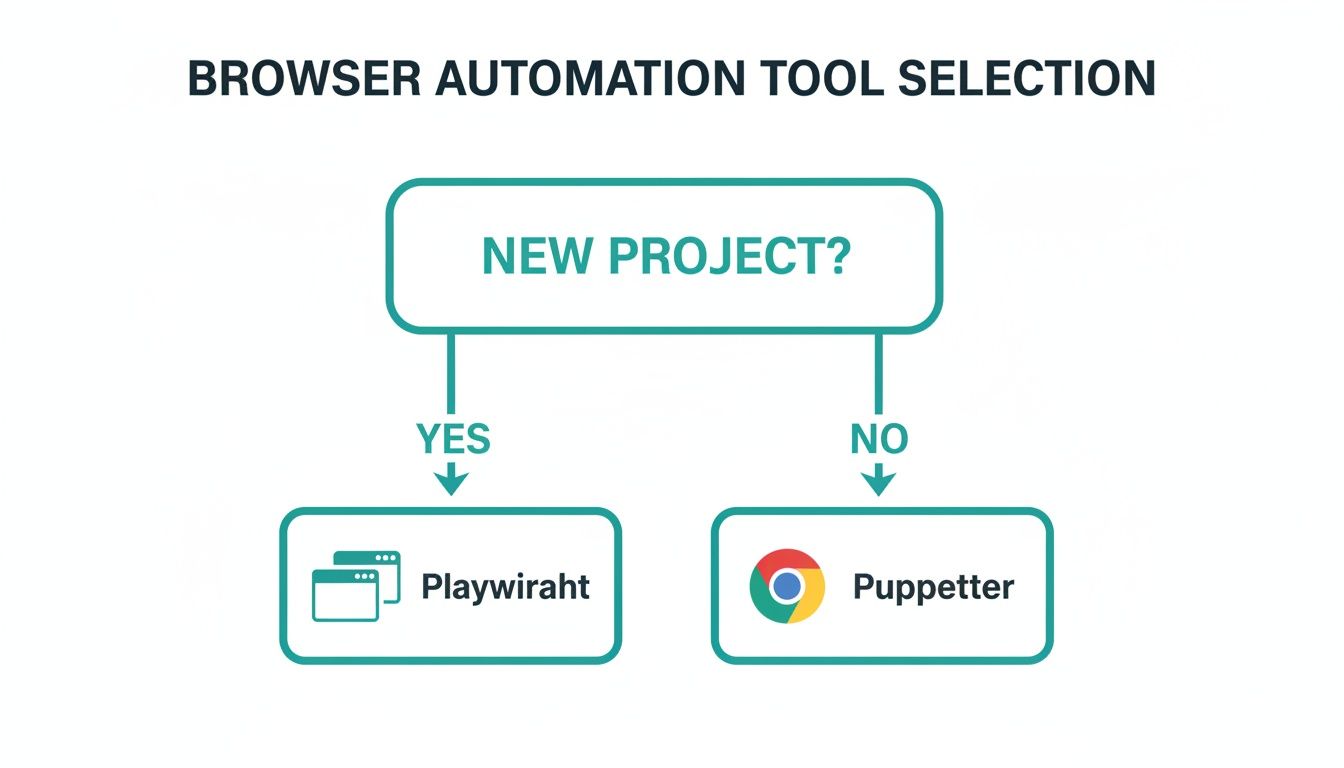
As you can see, the recommendation leans toward Playwright for new initiatives, where its modern architecture gives you a significant head start. Beyond testing, these libraries are the backbone of many data-driven operations, powering complex roles like a Senior Web Scraping Engineer who rely on them for sophisticated data extraction.
If you're interested in a broader view of the landscape, you can explore more options in our guide to automated website testing tools.
Comparing Core Architecture and Design Philosophy
To really get to the heart of the Playwright vs. Puppeteer debate, you need to look past the feature checklists and dig into how they're built. They actually share a bit of DNA—Playwright started as a fork of Puppeteer, created by some of the same developers who originally built it at Google. But that's where the similarities end; their paths diverged quickly due to two very different philosophies.
Puppeteer was born out of Google's Chrome team. Its mission was simple and focused: create a rock-solid, high-level API for controlling Chromium browsers using the Chrome DevTools Protocol (CDP). Its entire architecture is built on CDP, using native protocol commands for everything from clicks to keyboard inputs. For any automation task centered on Chrome, this direct approach makes it incredibly fast.
Playwright, on the other hand, was built to solve a different problem entirely: cross-browser compatibility. Its core mission is to offer a single, unified API that behaves identically across Chromium, Firefox, and WebKit. This is the single biggest architectural difference between the two.
The Protocol Abstraction Layer
Puppeteer's tight bond with the CDP is both its biggest strength and its main weakness. It delivers fantastic performance on Chromium, but this deep integration makes supporting other browsers a huge technical hurdle. For example, its experimental Firefox support has to rely on a translation layer to convert CDP commands into something Mozilla's WebDriver BiDi protocol can understand.
Playwright chose a different path. It built an abstraction layer that sits on top of each browser's native protocol. It still uses CDP for Chromium, but it communicates with Firefox and WebKit using their own proprietary debugging protocols. To keep behavior consistent across the board, Playwright often injects its own JavaScript into the page to handle commands. This ensures an action like page.click() works the exact same way everywhere.
The bottom line is this: Puppeteer goes deep on one browser engine (Chromium) for maximum performance. Playwright goes wide, prioritizing a consistent developer experience across all major browsers, even if it requires different technical solutions under the hood.
This diagram from Playwright's own documentation perfectly illustrates its multi-engine support.
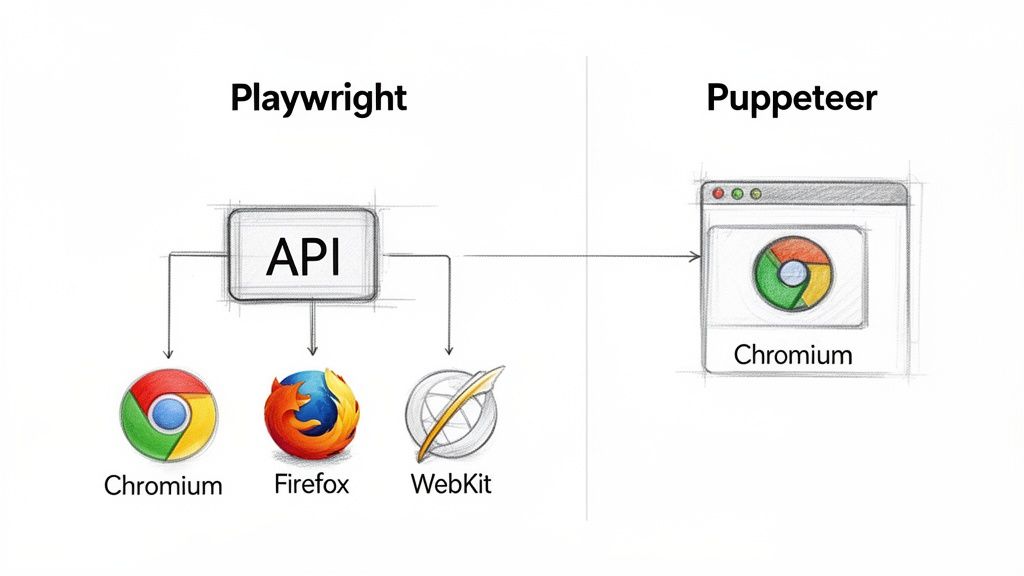
You can see right away what Playwright's main selling point is: one API to rule them all. This is a direct result of its core architectural choices.
Impact on Performance and Reliability
These architectural differences have real-world consequences for performance. Since Puppeteer sticks closer to native CDP commands, it often has a slight speed advantage for tasks that only involve Chromium. In high-volume scraping tests running on Chromium, we've seen Puppeteer perform 15-20% faster than Playwright. The reason is simple: native protocol commands just execute faster than JavaScript injected into a page.
But when it comes to reliability—especially for end-to-end testing—Playwright's architecture really shines. It heavily relies on its own in-page JavaScript to perform actionability checks, making sure an element is actually visible, stable, and ready for interaction before it proceeds. This is the secret sauce behind its incredible auto-waiting capabilities, which dramatically reduce the flaky tests that plague so many automation projects.
Analyzing Cross-Browser and Language Support
When you get down to the brass tacks of Playwright vs. Puppeteer, the biggest split comes down to browser and language support. This isn't just a minor feature discrepancy; it’s a core philosophical difference that will likely make the decision for you.
Puppeteer was born at Google with one job: to automate Chromium. And it does that job exceptionally well, giving you deep, granular control over the engine that powers both Chrome and Edge. If your world revolves entirely around Chromium-based browsers, Puppeteer is a powerful, focused tool.
Playwright, on the other hand, was built for a multi-browser reality from day one. It offers first-class, consistent automation across all three major rendering engines: Chromium (for Chrome and Edge), Firefox (Mozilla), and WebKit (Apple's Safari). For anyone doing serious end-to-end testing, this is a massive advantage.
The Cross-Browser Testing Advantage
With Playwright, running your test suite across every major browser is as simple as a few lines in a config file. You write the script once, and Playwright’s unified API takes care of the rest, even managing its own browser binaries to keep things consistent.
A typical Playwright test setup is beautifully simple:
- Project 1: Runs all tests on Chromium.
- Project 2: Runs the exact same tests on Firefox.
- Project 3: Runs them again on WebKit.
This completely changes the game for cross-browser validation. Trying to pull this off with Puppeteer is a much bigger headache. While there’s experimental Firefox support, it’s not a core feature and lacks the polish and reliability you get with Playwright. As for WebKit, there's no official support at all.
Key Takeaway: If your app needs to work flawlessly for users on Safari and Firefox, not just Chrome, Playwright is the clear winner. Its entire design is geared toward making cross-browser testing an effortless, integrated part of your workflow.
Exploring Language and SDK Diversity
The next major dividing line is language support, which dictates how easily a tool will slot into your team’s existing tech stack.
Puppeteer is a Node.js tool through and through, with official support only for JavaScript and TypeScript. While the JS ecosystem is huge, this is a dealbreaker for teams working in polyglot environments or those standardized on other backend languages.
Playwright casts a much wider net. It provides official, fully-featured Software Development Kits (SDKs) for the industry's most popular languages:
- JavaScript/TypeScript: For the Node.js crowd.
- Python: A huge win for teams in data science, web scraping, and backend development.
- Java: Perfect for large enterprise applications.
- .NET (C#): Covering teams building on the Microsoft stack.
This multi-language approach makes Playwright incredibly accessible. A Python developer can write automation scripts with the same power and ease as a TypeScript dev, no context-switching required. For any organization with a diverse tech stack, this flexibility is a critical factor in the Playwright vs Puppeteer debate.
The official Puppeteer website makes its JS/TS focus clear.
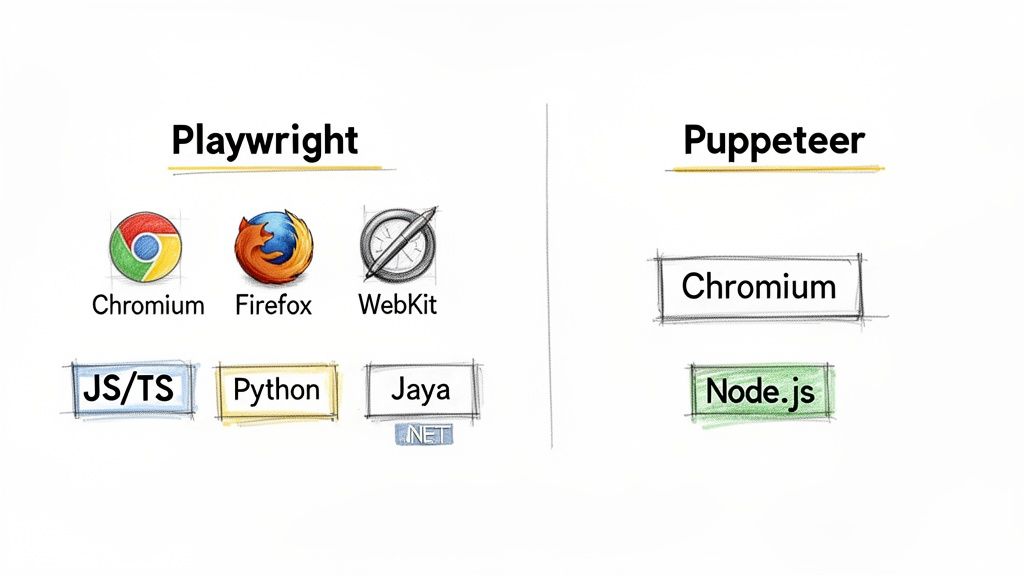
All the documentation and examples are squarely aimed at the Node.js world, reinforcing its specialized nature.
Ultimately, the choice becomes pretty clear based on these two factors. Puppeteer is laser-focused on Chromium, while Playwright provides robust, out-of-the-box automation for Chromium, Firefox, and WebKit under a single API. When you combine that with its broad language support, Playwright has become the go-to choice for new projects in 2025 that require serious cross-browser testing. You can find more discussion on this trend over on Contentful's blog.
Evaluating Performance, Reliability, and Scalability
In a production environment, the real measure of an automation tool isn't just raw speed—it's reliability. A script that runs perfectly on your local machine but crumbles under pressure in a CI/CD pipeline is more than just an annoyance; it's a bottleneck. When we look at Playwright vs. Puppeteer, their core architectural philosophies reveal major differences in how they handle performance, script stability, and scaling.
This is where the rubber meets the road. Unreliable scripts are often plagued by timing issues, where the code tries to interact with a web page before it's truly ready. It's a classic race condition that has frustrated developers for years.
Auto-Waiting: The Secret to Rock-Solid Scripts
Here’s where Playwright truly shines, and it’s arguably its most significant advantage: intelligent auto-waiting. This isn't just a minor feature; it's baked into the very core of how Playwright operates. Before it attempts any action, like clicking a button, Playwright runs a series of built-in checks. It automatically confirms the element is attached, visible, stable (not animating), enabled, and not covered by anything else.
Puppeteer, on the other hand, puts more of this burden on the developer. While it has some basic waiting capabilities, you'll often find yourself manually adding page.waitForSelector() or, worse, hard-coded page.waitForTimeout() calls. This approach not only clutters your code but makes your scripts brittle, as they can easily break with slight changes in network speed or page load behavior.
Playwright's auto-waiting is a fundamental shift in how we write automation. By handling actionability checks automatically, it eliminates an entire category of common flakiness, making your scripts more resilient right out of the box.
This built-in intelligence means your Playwright scripts are far better equipped to handle the unpredictable nature of modern web applications, where load times can vary.
Concurrency and Scaling for Heavy Workloads
When you need to run large test suites or perform high-volume web scraping, running tasks in parallel is non-negotiable. This is another area where the Playwright vs. Puppeteer comparison shows a clear divide. Playwright was designed from the ground up with parallelism in mind, making it incredibly straightforward to scale your operations.
In fact, many DevOps engineers and scraping experts now consider Playwright the default choice for large-scale work precisely because of its superior architecture for concurrency. One thorough tool comparison ranked Playwright first for parallel solutions, noting that Puppeteer is "not very well suited for concurrent solutions out of the box."
To get a clearer picture of what this means in practice, here’s a look at how their features impact developer experience and script reliability.
API Ergonomics and Reliability Features
A comparative look at key API features that impact developer experience and script reliability.
| Feature | Playwright | Puppeteer | Impact on Development |
|---|---|---|---|
| Auto-Waiting | Built-in for all actions, checks for visibility, stability, and more. | Limited, often requires manual waitForSelector or other explicit waits. |
Playwright drastically reduces flaky tests and simplifies code by eliminating the need for manual wait management. |
| Parallel Execution | Native support with workers and projects in the Playwright Test runner. | Requires manual setup, often using third-party libraries or custom logic. | Scaling test suites or scraping tasks is much easier and more efficient with Playwright's integrated tooling. |
| Browser Contexts | Highly optimized for creating isolated, lightweight browser sessions. | Supports contexts, but their management can be more resource-intensive. | Playwright enables cleaner and more memory-efficient parallelization, which is crucial for running many tasks at once. |
| Resource Management | Efficiently manages browser instances and cleans up resources. | Can lead to resource leaks if contexts and pages are not closed carefully. | Playwright's design leads to lower operational overhead and greater stability, especially in long-running processes. |
As you can see, Playwright's design choices are geared toward making the developer's life easier, especially when reliability and scale are top priorities. If you're looking to dive deeper into what makes a web application perform well, this guide on 9 Key Metrics To Monitor Website Performance is a great resource.
The Trade-Off: Is Raw Speed Everything?
It's worth noting that in specific, single-threaded benchmarks on Chromium, Puppeteer can sometimes pull ahead. Because it communicates directly with the Chrome DevTools Protocol (CDP), it can be 15-20% faster for simple, isolated tasks.
But this speed comes with a trade-off. It sacrifices the rich, cross-browser features and, most importantly, the robust stability that Playwright delivers. For the vast majority of real-world projects, that slight performance gain is quickly erased by the time spent debugging flaky tests or engineering a custom scaling solution.
Ultimately, Playwright’s emphasis on reliability provides a far more dependable foundation for any serious automation project. And for highly specialized use cases, like generating thousands of screenshots, you might even consider a dedicated screenshot as a service to offload all the infrastructure headaches.
Debugging Tools and Developer Experience
How quickly you can write, debug, and maintain scripts is what separates a good automation tool from a great one. A slick developer experience can make all the difference, and in the Playwright vs Puppeteer race, this is where Playwright really pulls ahead.
Puppeteer’s debugging workflow is what you might call traditional. It works, but it feels a bit old-school. You'll typically find yourself dropping await page.evaluate(() => { debugger; }) into your code, which pauses the script and pops open the browser's DevTools. For a seasoned developer, this is familiar territory, but it means constantly bouncing between your code editor and the browser inspector.
Playwright, on the other hand, built its toolkit from the ground up to address the specific headaches of browser automation. The result is a much smoother and faster development cycle.
Playwright’s Integrated Debugging Arsenal
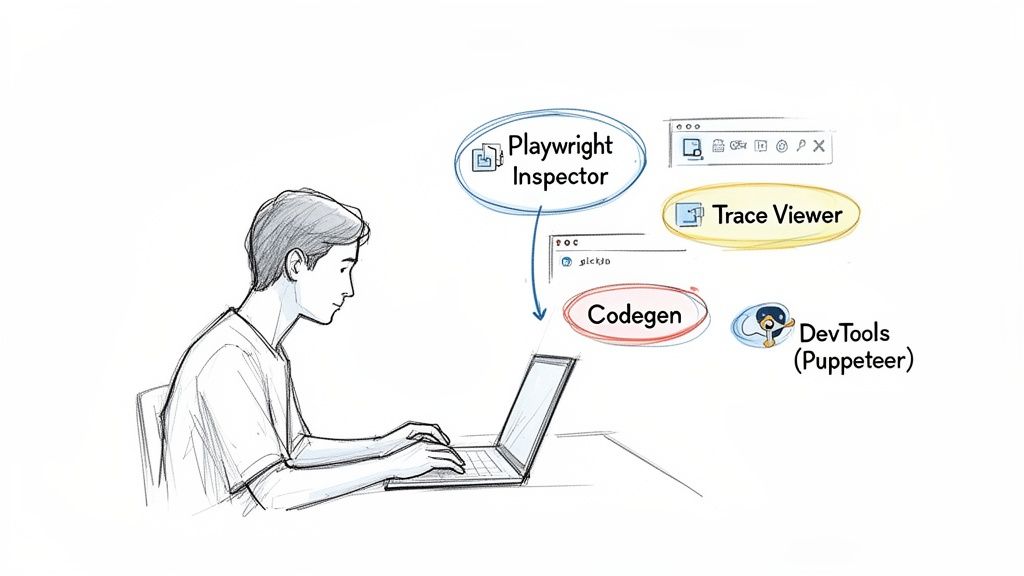
Playwright brings the debugging power right into your development environment, cutting out the friction that slows down troubleshooting. Three tools make a massive difference.
- Playwright Inspector: This is a GUI that launches with your script, letting you step through every command one by one. You can inspect selectors and see exactly what Playwright is doing in real-time, which is a lifesaver when you can't figure out why a script is failing.
- Codegen: A genius feature that records your browser interactions and spits out the Playwright code for you. It’s fantastic for quickly scaffolding a new test or figuring out the right selectors for tricky, dynamic elements.
- Trace Viewer: This might be Playwright's killer feature. The Trace Viewer captures a complete, step-by-step recording of your script's run. Afterward, you get a self-contained web app showing DOM snapshots, action logs, console output, and network requests for every single action.
The Trace Viewer is a game-changer for debugging CI/CD failures. Instead of trying to reproduce a flaky test, you get a complete, interactive recording of what went wrong, including screenshots before and after each action.
The Developer Experience Verdict
The difference in developer experience is pretty clear. Puppeteer gives you the basic, reliable tools you're already familiar with from Node.js and browser development. It gets the job done, but it demands more manual work and a bit more expertise to debug effectively.
Playwright delivers a far more refined and cohesive experience. Its tools are purpose-built to solve the exact problems you hit when writing automation scripts. Being able to generate code with Codegen, debug live with the Inspector, and perform post-mortem analysis with the Trace Viewer makes for a workflow that's just faster and more intuitive.
For any team building out a serious test suite or a complex web scraper, this superior developer experience is a huge deal. The time you save on debugging alone can easily make Playwright the better choice, letting you focus on writing solid automation instead of fighting with your tools.
When to Use a Screenshot API Instead
The whole Playwright vs. Puppeteer debate centers on which tool gives you the best hands-on control. But it's worth taking a step back to ask a bigger question: should you even be managing headless browsers yourself? When your goal is just to generate screenshots, the answer is often a resounding no.
Going the DIY route with browser automation saddles your team with a ton of operational overhead that quietly eats up time and money. You suddenly become responsible for everything: provisioning servers, scaling them for peak loads, keeping browsers updated, and patching security holes. This isn't a one-and-done setup; it's a constant maintenance cycle that pulls developers away from your actual product.
The Hidden Costs of Self-Managed Screenshots
The true expense of a homegrown screenshot solution isn't just what you pay for servers. The real cost is measured in engineering hours spent wrestling with flaky scripts, decoding cryptic browser crashes, and building out logic to handle the messy reality of the modern web.
- Handling Popups and Banners: Your script has to be smart enough to find and dismiss cookie consents, newsletter popups, and ad overlays just to get a clean shot. This code is fragile and breaks every time a site changes its layout.
- Ensuring Consistency: Getting pixel-perfect, identical screenshots across different machines is a nightmare. Subtle differences in fonts, rendering engines, and OS-level settings can throw everything off.
- Scaling for Performance: Need to generate thousands of screenshots in a hurry? Scaling your own fleet of headless browsers is a serious infrastructure challenge, one that requires dedicated DevOps expertise.
The heart of the problem is that taking a perfect screenshot is a specialized task. When you decide to build this feature yourself, you’re essentially building a whole new product—one that needs its own maintenance, scaling, and support.
Shifting to a Managed Service
This is exactly where a dedicated screenshot API changes the game. Instead of fighting with browser management, you hand off the entire problem to a service that was built from the ground up to solve it. A single API call can replace hundreds of lines of brittle automation code and wipe out all your infrastructure headaches in one go.
Services like ScreenshotEngine are engineered to handle these issues right out of the box. The platform takes care of all the tricky parts, from automatically blocking ads and cookie popups to making sure every capture is crisp and reliable. This completely reframes the problem from building and maintaining a system to simply using a dependable service.
If you're curious about the mechanics, you can learn more by reading this guide on what a screenshot API is and how it simplifies this entire process.
Just look at how straightforward it is to configure and generate a screenshot using the ScreenshotEngine API playground.
The UI gives you simple options for the URL, viewport size, and image format, letting you generate a perfect capture with a single click.
When a Screenshot API is the Right Choice
Opting for a screenshot API over a self-managed Playwright or Puppeteer script isn't just about convenience—it's about focus. It frees up your development team to build features that matter to your customers, instead of forcing them to become experts in the arcane details of headless browser automation.
A dedicated API is almost always the better choice when:
- Speed is critical: You need screenshots back in milliseconds, not seconds.
- Reliability is non-negotiable: Your application can't afford flaky or failed captures.
- You need advanced features: Your use case requires full-page captures, targeting specific elements, or different output formats like PNG, JPEG, or WebP.
- You want to reduce operational load: Your team's time is far more valuable when spent on your core product, not on managing browser infrastructure.
At the end of the day, Playwright and Puppeteer are fantastic general-purpose automation tools. But if your primary goal is capturing high-quality images of websites at scale, a specialized screenshot API is simply a more efficient, reliable, and cost-effective solution.
Frequently Asked Questions
When you're deep in the trenches comparing Playwright and Puppeteer, a few common questions always seem to pop up. Let's tackle them head-on to help you make the right call for your project.
When Should I Still Choose Puppeteer Over Playwright?
Even with Playwright's rise, Puppeteer still has its place. It’s an excellent choice if your project is laser-focused on Chrome or Chromium and you need granular, low-level control via the Chrome DevTools Protocol (CDP). For high-volume, Chromium-only tasks, this direct-to-CDP architecture can give you a 15-20% performance edge.
Puppeteer is also the pragmatic pick if you're already sitting on a mountain of existing scripts and infrastructure. If cross-browser testing isn't a pressing need, the cost and hassle of a full migration might simply not be worth the payoff.
How Difficult Is Migrating From Puppeteer to Playwright?
For most basic scripts, the jump isn't too painful. Since Playwright started as a fork of Puppeteer, many of the core API concepts will feel instantly familiar—think page.goto() or page.click(). That shared DNA definitely smooths out the initial transition.
The real work comes in refactoring your code to embrace Playwright's more advanced features, especially its robust auto-waiting system. This is actually a good thing, as it lets you delete a ton of explicit waitForSelector lines. However, you'll need to thoroughly test your old logic to ensure it behaves correctly with Playwright's new way of handling timing.
Migration Insight: The key isn't just a find-and-replace on function names. It's about learning to trust Playwright’s built-in "actionability" checks and letting go of manual waits. This shift in mindset is what leads to cleaner and far more resilient automation scripts.
Can I Use These Tools For More Than Just Testing?
Absolutely. While they're fantastic for end-to-end testing, that’s just scratching the surface. Their ability to steer a real browser programmatically makes them automation powerhouses for all sorts of tasks.
Here are a few common use cases beyond testing:
- Web Scraping and Data Extraction: Perfect for pulling data from dynamic, JavaScript-heavy sites that stump simpler tools.
- Report Generation: Easily create PDFs or capture screenshots of web pages for reports and archives.
- Task Automation: Automate just about any repetitive browser-based workflow, like filling out forms or creating accounts.
- Performance Monitoring: Collect Core Web Vitals and other performance metrics directly from live websites.
- Visual Regression Testing: Snap screenshots of your UI to catch unintended visual changes before they hit production.
How Does a Screenshot API Compare to Running My Own Script?
Running your own Playwright or Puppeteer script gives you ultimate control, but it also saddles you with all the operational headaches. You're now in charge of managing browser versions, dealing with random crashes, scaling your infrastructure to meet demand, and writing custom logic to handle every cookie banner and ad that gets in the way.
A dedicated screenshot API, on the other hand, handles all that messy work for you. You just send a simple API request and get a perfect, clean screenshot back. It’s a managed service engineered for reliability and speed, making it a no-brainer for apps where high-quality screenshots are a core feature, not an afterthought.
For teams that need pixel-perfect, reliable screenshots without the maintenance burden, ScreenshotEngine offers a developer-first API that takes care of everything. Ditch the hassle of managing headless browsers and get flawless screenshots in milliseconds at https://www.screenshotengine.com.